HMI de adquisición y control con ArduinoArduino data acquisition & control HMI
Una pequeña HMI de escritorio para ver lo que mide un Arduino y ajustar sus salidas, sin depender del monitor serie.
A small desktop HMI to see what an Arduino measures and adjust its outputs, without relying on the serial monitor.
 Captura realReal screenshot
01ResumenSummary
Interfaz gráfica en Python que se comunica con un Arduino por puerto serie para enviar y recibir datos analógicos. Muestra dos señales en un gráfico animado con Matplotlib y permite variar dos salidas PWM con deslizadores.
Python GUI that talks to an Arduino over serial to send and receive analog data. It shows two signals on an animated Matplotlib chart and lets you vary two PWM outputs with sliders.
02ProblemaProblem
Al probar un prototipo, el monitor serie solo muestra números en texto y no permite actuar sobre el circuito. Hace falta ver la forma de la señal y, al mismo tiempo, modificar salidas para observar la respuesta.
When testing a prototype, the serial monitor only shows numbers as text and doesn't let you act on the circuit. You need to see the signal's shape while changing outputs to observe the response.
03ObjetivosGoals
- Conectarse a cualquier puerto COM y velocidad sin editar el código.Connect to any COM port and baud rate without editing code.
- Graficar dos señales en tiempo real.Plot two signals in real time.
- Controlar dos salidas PWM desde la interfaz.Control two PWM outputs from the interface.
- Pausar y reanudar la gráfica para inspeccionar un evento.Pause and resume the plot to inspect an event.
04Solución implementadaImplemented solution
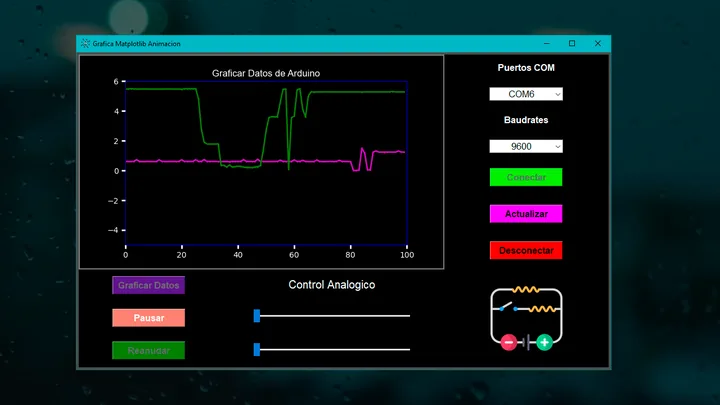
La ventana se divide en tres zonas: a la derecha, la configuración de conexión (puertos COM, baudios, Conectar, Actualizar y Desconectar); a la izquierda, el gráfico de las dos señales con los controles Graficar, Pausar y Reanudar; abajo, dos deslizadores de control analógico que fijan el valor de las salidas PWM del Arduino.
The window has three zones: on the right, connection settings (COM ports, baud rate, Connect, Refresh and Disconnect); on the left, the two-signal chart with Plot, Pause and Resume controls; at the bottom, two analog control sliders that set the Arduino's PWM outputs.
05Arquitectura técnicaTechnical architecture
- Hardware: Arduino con entradas analógicas y salidas PWM.Hardware: Arduino with analog inputs and PWM outputs.
- Enlace: puerto serie USB con velocidad configurable.Link: USB serial port with configurable baud rate.
- Aplicación: Tkinter para la interfaz y Matplotlib embebido para la gráfica animada.Application: Tkinter for the UI and embedded Matplotlib for the animated chart.
06Mi contribuciónMy contribution
Diseñé y programé la interfaz, la comunicación serie y la graficación, y grabé un tutorial que explica el proyecto paso a paso.
I designed and programmed the interface, serial communication and plotting, and recorded a tutorial that explains the project step by step.
07Decisiones de diseño e ingenieríaDesign & engineering decisions
- Puerto y velocidad seleccionablesSelectable port and baud rate
- La misma aplicación sirve en cualquier PC y con distintos sketches.The same app works on any PC and with different sketches.
- Pausar / reanudarPause / resume
- Congelar la gráfica permite analizar un transitorio sin detener la adquisición del equipo.Freezing the chart lets you analyze a transient without stopping the device.
- Deslizadores para PWMSliders for PWM
- Un control continuo es más natural que escribir valores y muestra el efecto al instante.A continuous control feels more natural than typing values and shows the effect instantly.
- Colores por funciónColor by function
- Conectar, actualizar y desconectar se distinguen a simple vista.Connect, refresh and disconnect are distinguishable at a glance.
08Dificultades y solucionesChallenges & solutions
- Puertos que cambian entre equipos: se listan los puertos disponibles y un botón Actualizar vuelve a detectarlos.Ports that change between machines: available ports are listed and a Refresh button detects them again.
- Liberar el puerto: un botón Desconectar cierra la comunicación para poder volver a cargar el sketch sin cerrar la app.Releasing the port: a Disconnect button closes the link so the sketch can be re-uploaded without closing the app.
09ResultadosResults
Aplicación funcional demostrada en video: conexión configurable, gráfica animada de dos señales, pausa y reanudación, y control de dos salidas PWM. El tutorial está disponible públicamente en YouTube.
Working application shown on video: configurable connection, animated two-signal chart, pause and resume, and control of two PWM outputs. The tutorial is publicly available on YouTube.
10Imágenes y diagramasImages & diagrams
La captura al inicio de la página muestra la aplicación en funcionamiento: gráfico con dos señales, panel de conexión y deslizadores. El video del tutorial muestra la interacción completa con el Arduino.
The screenshot at the top of the page shows the application running: two-signal chart, connection panel and sliders. The tutorial video shows the full interaction with the Arduino.
11AprendizajesLearnings
Una interfaz sencilla acorta mucho el ciclo de prueba de un prototipo. Este proyecto fue la base de trabajos posteriores en los que reemplacé el puerto serie por MQTT para operar equipos a distancia.
A simple interface greatly shortens a prototype's test cycle. This project laid the groundwork for later work where I replaced serial with MQTT to operate equipment remotely.